 Okaycrew™
 Okaycrew by Ridgeline Apps · Windows desktop app
Your bots. Your keys. Your PC.
Okaycrew runs AI bots on your own Windows PC. Bring your own API keys, or use local AI models through Ollama or LM Studio. No Okaycrew account, and anything risky waits for your OK.
- Runs on your PC
- Your own API keys
- Local models via Ollama or LM Studio
- No Okaycrew account
Keys are encrypted on this PC with Windows DPAPI; bots, chats and memory stay in your data folder; requests go straight from this PC to the AI providers and connectors you set up. See the privacy policy.
Free · Version 0.4.4 · Windows 10/11 (64-bit) · How to install
No Okaycrew account. Your keys, your PC.
There's no Okaycrew account to create. You paste in your own API keys, or point Okaycrew at a model running on your own machine, and pay the providers directly at their rates (local models cost nothing extra).
- Keys are encrypted on this PC with Windows DPAPI; bots, chats and memory stay in your data folder; requests go straight from this PC to the AI providers and connectors you set up. Saved site logins are encrypted the same way. Other programs running under your Windows account could read them, so only save logins on a PC you trust.
- See the privacy policy for every connection the app can make.
- Detect local models finds a running Ollama, LM Studio or other local server, so you can skip cloud keys entirely.
Works with
OpenAIAnthropicGoogle GeminixAINVIDIA API Catalog OllamaLM Studio
Bring your own API key for OpenAI, Anthropic, Google Gemini, xAI or NVIDIA. Connect other OpenAI-compatible servers by URL, or run models locally with Ollama, LM Studio and similar tools.
You use your own account with each provider, subject to that provider's terms. If one provider fails, bots can switch to another automatically. Turn on Prefer local to use your local models first.
What's in Okaycrew 0.4.4
Okaycrew ships with no bots. Start from a template or a blank bot and decide what it can do: its role, model, tools, memory and schedule.
45 connectors in the gallery
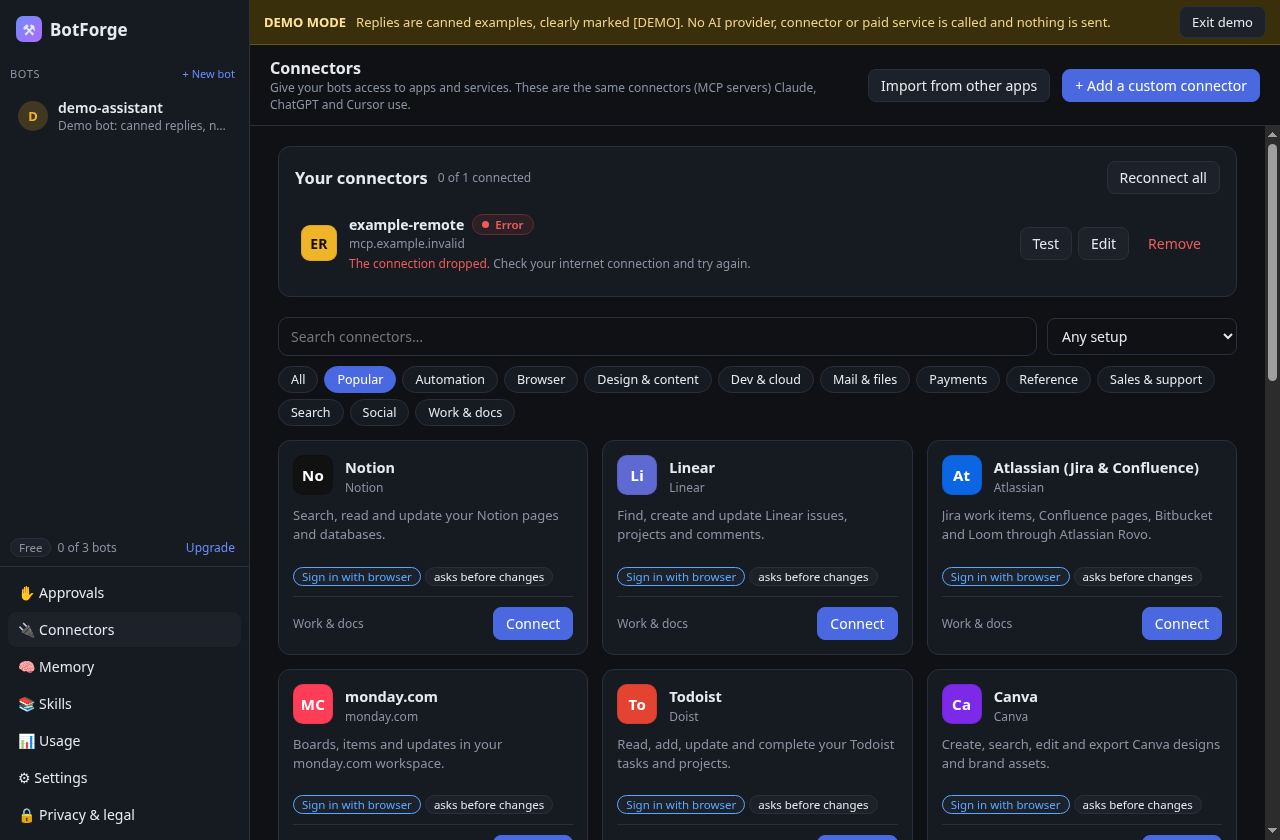
18 official sign-in servers plus 27 curated presets (reviewed for install source and approval gates). Connect MCP servers such as GitHub, Notion, Linear, Google Workspace and Playwright. Sign in with your browser or paste a key, and Okaycrew finds the programs a connector needs. Some connectors need an account with that service. You can also import connectors you set up in other AI apps.
Approvals before risky actions
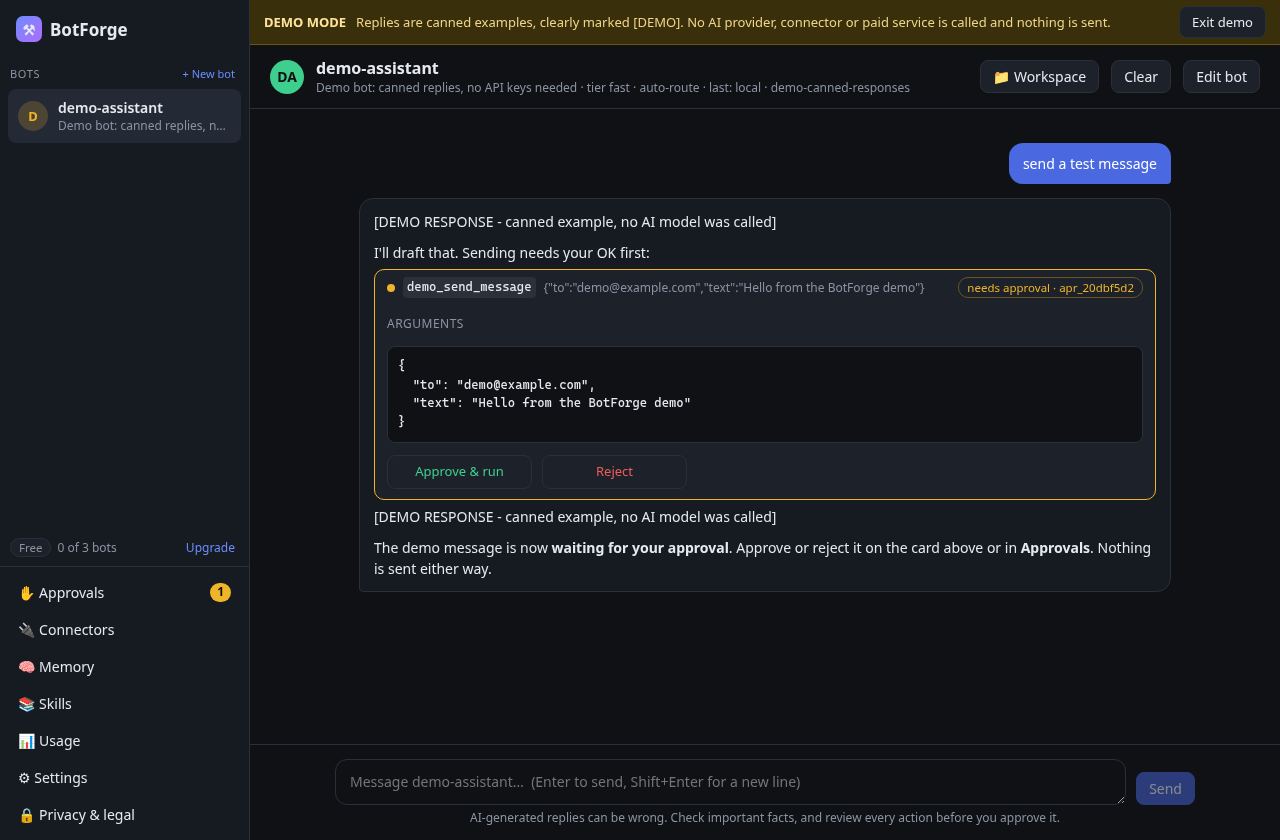
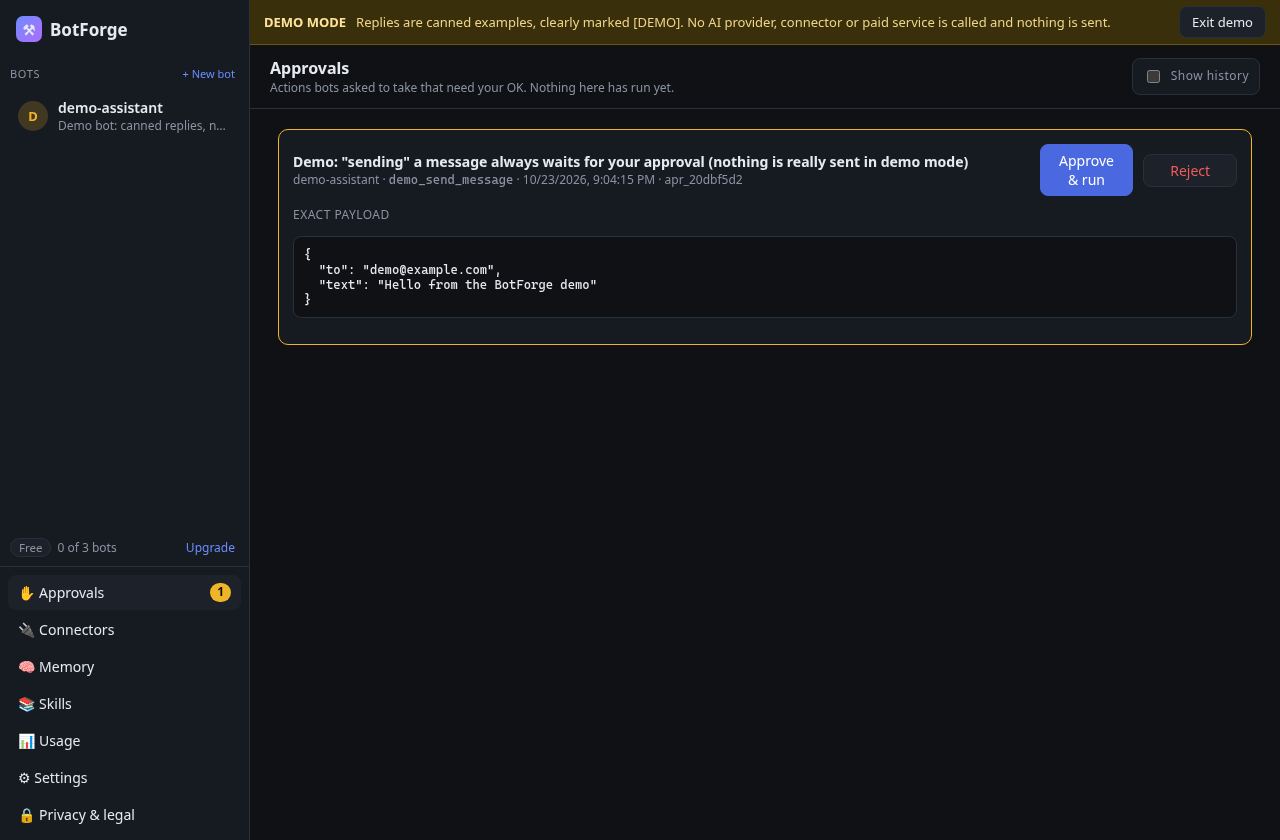
Submitting, buying, sending, deleting, signing in and shell commands outside the bot's workspace ask first by default. The Approvals screen shows the exact action before anything runs.
Shared memory
One local memory for all your bots. Browse, search, add, edit, pin, forget and restore entries.
Skills
Install SKILL.md skills from a GitHub URL or a local folder, turn each on or off, and assign it to the bots that need it.
A big red STOP
A STOP bar appears whenever a bot is driving a browser or running a task. STOP all (or Ctrl+Alt+Backspace) stops every bot.
Usage and budgets
See tokens and estimated cost per bot, provider and model. Set a monthly budget that pauses a bot when it's reached. Estimates are not a guarantee; your provider's bill is what counts.
Computer use (opt-in)
Per bot: Edge or Chrome via Playwright with a separate profile, PowerShell that asks before running commands outside folders you allow (an approval check, not a sandbox), or a cloud browser with your own key.
Tray, schedules and remote access
Keep scheduled bots running from the tray. Optional remote access lets you approve actions from your phone through your own Cloudflare Tunnel (off by default).
Easy setup
Onboarding walks you through keys with a Test button for each, imports a .env file in one click, and has a demo mode with no keys at all.
Pricing
Checkout is not open yet. You always pay your AI providers directly, or nothing at all with local models. Prices in US dollars. Sales tax (including Ohio sales tax) is added on top of the price where required.
Free
$0
- Up to 3 bots
- Your own API keys or local models
- Approvals, shared memory, STOP all
Pro
$10/month (planned price, not on sale yet)
- Everything in Free
- Use it on up to 3 of your devices
- Pro stays on until the end of the period you paid for
Okaycrew isn't on sale yet. Joining the waitlist is free and doesn't commit you to buy. Prices shown are planned and may change before launch. You'll see the final price and terms before you pay anything. The free plan works now.
Each paid license is for one person and works on up to 3 devices at a time. 14-day refund on your first purchase, no questions asked. See the refund policy and Terms of Sale.
Download
Okaycrew 0.4.4 for Windows 10 and 11 (64-bit). It installs for your user account only; no admin rights needed.
97.9 MB · SHA-256: 583bd813eaf3428a918a8de831a84535c8b0930c57cb37c91becb114c8aff5db (Okaycrew-Setup-0.4.4-x64.exe.sha256)
System requirements
- Windows 10 (22H2) or Windows 11, 64-bit (x64)
- About 400 MB of disk space, plus space for your bots' files
- 4 GB of RAM (8 GB or more if you run local models; those need their own hardware)
- An internet connection for cloud AI providers (local models work offline)
- Your own API key from at least one AI provider, a local model server, or demo mode
Windows SmartScreen will warn you
The installer is not code-signed yet (our Microsoft code-signing certificate is still being set up), so Windows may show "Windows protected your PC". To run it:
- Download the installer only from this page.
- Optional: check its SHA-256 matches the checksum file (PowerShell:
Get-FileHash .\Okaycrew-Setup-0.4.4-x64.exe). - Double-click it. If SmartScreen appears, click More info, check the publisher text, then Run anyway.
- Follow the installer. Okaycrew opens to a short setup.
If you're not comfortable running unsigned software, wait for the signed release. We'll update this page.
FAQ
- Do I need an account?
- No. You only need keys for the AI providers you choose, or a local model.
- Can I use only local AI models?
- Yes. If Ollama, LM Studio or another OpenAI-compatible server is running, Okaycrew can detect it and you can skip cloud keys.
- Do you see my API keys or chats?
- No. Keys are encrypted on this PC with Windows DPAPI; bots, chats and memory stay in your data folder; requests go straight from this PC to the AI providers and connectors you set up. See the privacy policy.
- Who pays for AI usage?
- You do, directly to each provider, at their prices. Okaycrew's budget feature gives estimates only.
- Is there a Mac or Linux version?
- Not now. Okaycrew is built for Windows 10/11 (64-bit).
- Need help?
- Email [email protected]. Okaycrew is made by Ridgeline Apps LLC in Ohio.